Business Management Software: Compare Top Solutions for Your Team
Think of business management software as the central nervous system for your company. It’s a category of tools designed to pull everything together, from tracking projects to managing your finances. For small teams especially, it’s the ticket out of chaotic spreadsheets and scattered email chains, turning manual grunt work into smooth, automated processes.
Understanding Your Business Command Centre

Picture your business as an orchestra. You have different sections—sales, marketing, finance, operations—each playing a crucial part. Without a conductor, you just get a mess of noise. Business management software is that conductor, making sure every part works in sync to create something productive and harmonious.
It’s all about centralising information, automating the boring stuff, and giving your entire team one place to find the truth. No more digging through ancient emails for a client’s phone number or manually updating a project status in a spreadsheet. Instead, all that critical data lives in one easy-to-access hub. This isn't just about being more organised; it's about fundamentally changing how you get work done.
From Manual Chaos to Automated Clarity
If you’re a freelancer or part of a small team, you know the daily grind. You're constantly juggling tasks that drain your time and energy. This is where business management software really proves its worth by tackling the very problems that hold you back.
These platforms are designed to fix common headaches:
- Disorganised Workflows: Sticky notes and half-remembered to-do lists get replaced with structured tasks, clear project timelines, and defined responsibilities.
- Missed Deadlines: With automated reminders and visual progress trackers, important dates stay top-of-mind, slashing the risk of embarrassing delays.
- The Endless Chase for Payments: Built-in invoicing and payment tracking mean you spend less time sending awkward "just checking in" emails and more time on actual paying work.
A business without a central management system is like a library with no catalogue. All the information might be there, but finding what you need is a slow, frustrating, and inefficient process.
By bringing order to these key areas, you get your valuable hours back. That’s time you can reinvest into things that actually grow your business, like finding new clients, improving your services, or just thinking about the big picture. The goal is to stop reacting to constant fires and start proactively controlling your operations.
Comparing the Old Way with the New Way
The contrast between sticking with old-school methods and adopting a proper software solution is night and day. Sure, spreadsheets and emails can get you started, but they quickly become a liability as your business grows. They just don't offer the automation, integration, or real-time view you need to operate effectively today.
To see what this looks like in practice, here’s a quick comparison.
Manual Methods vs Business Management Software
| Task | Manual Method (e.g., Spreadsheets) | Business Management Software |
|---|---|---|
| Project Tracking | Manually updating cells, which leads to errors and stale data. | Real-time dashboards, automated status updates, and shared timelines. |
| Client Communication | Digging through scattered email threads and chat messages. | Centralised client profiles with all communication history in one place. |
| Invoicing & Payments | Creating invoices by hand, tracking payments in a separate file. | Automated invoice generation, payment reminders, and integrated processing. |
| Reporting | Wasting hours pulling data from different places to build reports. | Instant, customisable reports with just a few clicks for clear insights. |
At the end of the day, bringing in business management software is about building a foundation that can scale. It organises your business right now while preparing it for whatever comes next, ensuring your processes don't crack under the pressure of growth.
Essential Features Your Business Needs

When you first start looking at business management software, the sheer number of features can feel like you're staring at a wall of buttons. It's easy to get lost. The trick is to ignore the noise and focus on the core tools that will actually make a difference to your day-to-day work.
Think of it less like buying a gadget with a million settings and more like building a custom toolkit. Every tool needs to have a specific, useful purpose. For most freelancers and small businesses, this toolkit is built around four key areas: managing money, tracking projects, nurturing client relationships, and understanding your performance.
By breaking it down this way, you can quickly see what will solve your biggest headaches and what’s just a nice-to-have. It’s all about finding a solution that fits how you actually work.
Financial Management and Invoicing
Let’s be honest: cash flow is everything. Financial management features are designed to keep it moving in the right direction. This isn't just about sending out invoices; it's about automating the entire cycle so you get paid on time, without having to chase people down.
These tools are about making your operations more efficient, not just balancing the books. Consider that nearly 70% of companies still wrestle with manual invoice data entry—a surefire recipe for slow payments and costly errors. Automating this one area frees up an incredible amount of time and stops mistakes before they happen.
Here are the financial features that really matter:
- Invoice Creation and Tracking: The ability to generate a professional-looking invoice in minutes and then see its status at a glance—sent, viewed, paid, or overdue—from a single dashboard.
- Automated Payment Reminders: Set up polite, automatic nudges for clients when a due date is near or has passed. It takes the awkwardness out of following up.
- Expense Management: A simple way to snap photos of receipts and categorise expenses as they happen. This makes tax time infinitely less painful.
- Online Payment Integration: Letting clients pay you directly through the invoice with a credit card or bank transfer is one of the fastest ways to shorten your payment cycle.
Getting these functions right turns financial admin from a chore you dread into a smooth, almost invisible part of your workflow. You can learn more about the specific invoice tracking features Billzy offers to see how a specialised tool can slot into your broader setup.
Project and Task Management
This is the engine room of your business—the system that makes sure work actually gets done. Project management features give you the structure to take an idea from a vague concept to a finished product without chaos taking over.
Ever tried building flat-pack furniture without the instructions? You might get there eventually, but it’s going to be frustrating and messy. Project management tools are those instructions, giving you and your team a clear, step-by-step plan to follow.
A great project management tool doesn’t just tell you what to do; it creates a shared reality for your team. Everyone sees the same priorities, deadlines, and progress, which eliminates confusion and builds momentum.
Look for these key project capabilities:
- Task Lists and Assignment: The power to break big projects into small, concrete tasks and assign them to people with clear deadlines.
- Visual Project Timelines: Tools like Kanban boards or Gantt charts that let you see the entire project at a glance, spot bottlenecks, and adjust on the fly.
- File Sharing and Collaboration: A central hub to keep all project files, documents, and feedback attached directly to the relevant task. No more hunting through email chains.
- Time Tracking: A simple way to log hours against tasks and projects. This is crucial for improving future quotes, managing workloads, and making sure your work is profitable.
Client Relationship Management (CRM)
Your clients are the reason your business exists, and a CRM is what helps you manage those relationships with the care they deserve. Think of it as your business's central memory bank for every client interaction.
Without a CRM, that crucial knowledge is scattered across inboxes, notebooks, and people’s heads. That’s not just inefficient; it’s risky. A good CRM ensures you deliver a consistent, personal experience every time, no matter who on your team is talking to the client.
Essential CRM features include:
- Contact Database: A clean, organised place to store all client information—names, companies, emails, phone numbers, and notes.
- Communication History: A log of every email, call, and meeting. This gives anyone on your team the full context of a relationship in seconds.
- Sales Pipeline Management: For businesses focused on growth, this feature visualises your sales process, helping you track leads as they move from first contact to a done deal.
These three pillars—finance, projects, and clients—are the foundation of an effective business management system. By focusing on getting these right, you build a tech stack that truly supports your daily work and prepares you for growth.
Choosing Your Path: All-in-One Suites vs. Specialist Tools
When you start looking for business management software, you’ll quickly hit a fork in the road. Should you go for an all-in-one suite that claims to do everything? Or is it better to hand-pick specialised, best-in-class tools for each job? It’s the classic debate: the Swiss Army knife versus a set of dedicated chef's knives.
At first glance, the Swiss Army knife—the all-in-one platform—looks incredibly appealing. One vendor, one login, and one monthly bill. It sells the dream of a world where every single function, from project management to accounting to client emails, is all under one roof.
But that convenience often comes with a hidden price. These huge suites are frequently packed with features a freelancer or small team will never, ever use. You end up with a bloated, confusing interface and a higher bill for functionality you simply don't need.
The All-in-One Suite: Promise and Peril
An all-in-one system is built to be the command centre for your entire business. Its biggest selling point is the built-in integration; data you enter in one place, like a new client in the CRM, should magically pop up everywhere else it’s needed. No manual work required.
While that sounds perfect, the reality can be a bit different. The individual modules within a suite are often good, but they're rarely great. You might get a decent project management tool but find yourself stuck with a clumsy, subpar invoicing system. This forces you to bend your workflow to fit the software's limitations, not the other way around.
The biggest risk with an all-in-one suite is paying a premium for mediocrity across the board. You get a jack of all trades, but a master of none, which can end up slowing you down instead of speeding you up.
This approach tends to work best for larger companies with complex departments that can justify the high cost and have the people to manage a more complicated system. For a small, nimble business, it can feel like trying to park a bus in a space built for a scooter.
Embracing the Specialist Tool Stack
The alternative is to build your own custom 'stack' of specialised tools. Think of it like assembling a personalised toolkit where every instrument is the absolute best one you can find for a specific task. You might use one app for task management, another for client relationships, and a dedicated tool like Billzy for tracking invoices.
This approach gives you incredible flexibility and often works out to be more cost-effective. You only pay for the exact features you need, and each tool is expertly designed to solve one problem exceptionally well. A dedicated invoicing app, for instance, will have much deeper features for payment reminders and cash flow analysis than the basic invoicing module tacked onto a generic all-in-one suite.
The main challenge, of course, is making sure all these different tools can talk to each other. Thankfully, most modern apps are built to integrate, often through direct connections or third-party services that act as a bridge. This lets you create a powerful, interconnected system that’s perfectly tailored to how you actually work.
Making the Right Choice for Your Business
Deciding which path to take really comes down to understanding what you need day-to-day. Don't get distracted by a long list of features you'll never touch. Instead, map out your biggest operational headaches and look for the simplest, most effective tools to solve them.
For many modern small and medium-sized enterprises (SMEs), the lean, agile approach of a specialist stack is proving to be the winning strategy. You can see this trend playing out in growing tech hubs around the world. In Latin America, for example, SMEs are driving huge growth in the Software-as-a-Service market, commanding an estimated 70% market share within a market projected to be worth USD 22.02 billion by 2025. That boom is fuelled by the demand for affordable, scalable solutions—like lightweight invoicing tools—that solve immediate cash flow problems without the baggage of a complex suite. You can read more about the SaaS market trends in Latin America.
At the end of the day, your software should work for you, not make more work for you. Whether you choose an all-in-one platform or a custom stack of specialist tools, the goal is to find a solution that genuinely simplifies your life and clears the way for growth.
How to Choose the Right Business Management Software
Staring at the endless list of software options? It’s completely normal to feel overwhelmed. Picking the right business management software feels like a monumental decision, but it doesn’t have to be a stressful one. If you break it down into a few common-sense steps, you can cut through the noise and land on the perfect choice.
The secret isn’t finding the platform with the longest feature list. It’s about finding the one that solves your biggest headaches with the least amount of fuss. A little bit of structured thinking now will save you from a world of expensive regret down the road.
Pinpoint Your Core Problems First
Before you even think about looking at software websites, grab a pen and paper. What’s actually broken in your business right now? Are you spending hours chasing down late payments? Are projects falling behind because no one is clear on who’s doing what?
Jot down your top three to five operational bottlenecks. Get specific. Don't just write "get organised." Instead, write "create a central place for client feedback so it stops getting lost in my inbox."
The number one mistake people make is getting wowed by a flashy feature list instead of focusing on what solves their real, day-to-day problems. A simple tool that fixes your biggest issue is infinitely more valuable than a complex suite that does a hundred things you don't need.
This "problem-first" mindset becomes your compass. It helps you instantly filter out the noise and keeps you focused on what truly matters to your business.
Define a Realistic Budget and Scope
Next up, let's talk money and ambition. What can you genuinely afford to spend each month? Look past the shiny subscription price—are there hidden setup fees, training costs, or extra charges per user? Get the full picture.
It's also crucial to decide on your scope. Are you after an all-in-one platform that promises to run your entire business? Or do you just need a fantastic specialist tool to handle one specific area, like invoicing? This is a key fork in the road.
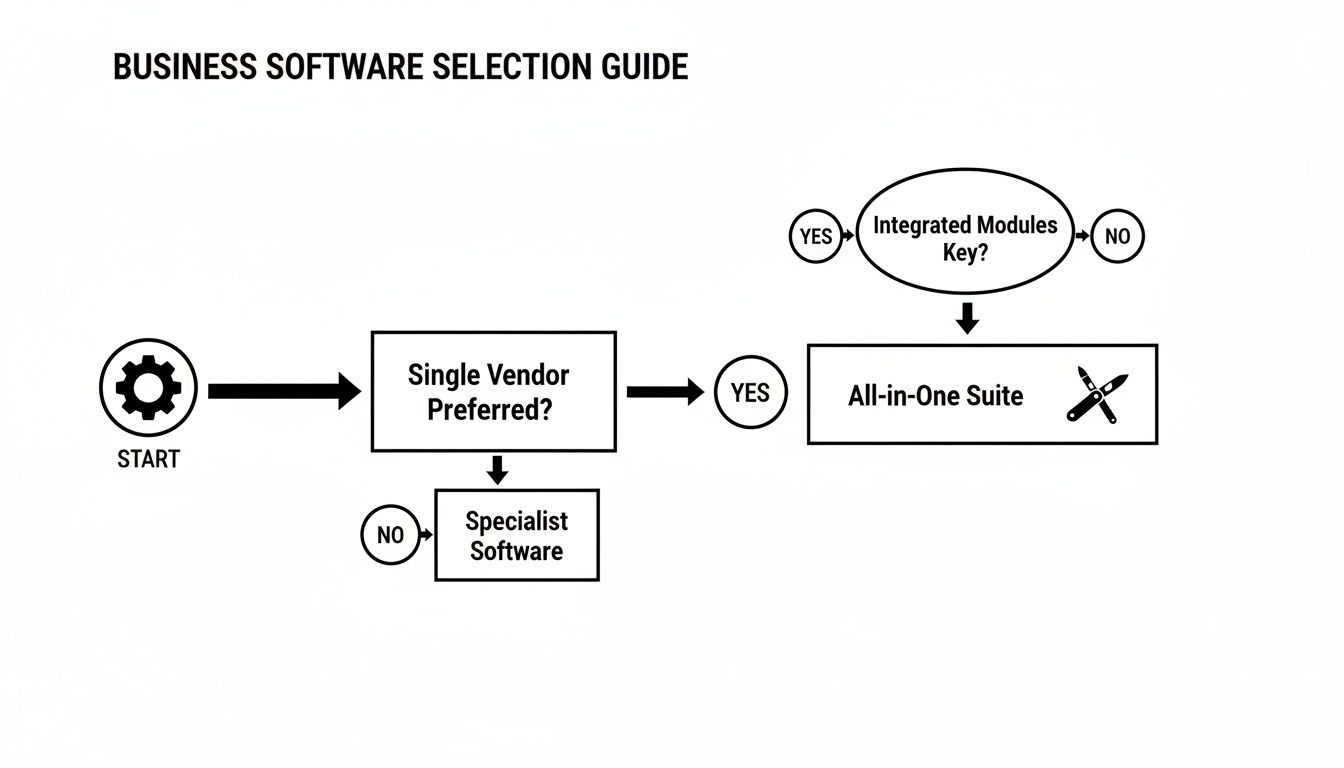
This decision tree lays out that fundamental choice: go broad with a comprehensive suite or go deep with a focused tool. Thinking about the different pricing models for business software at this stage will make comparing your options much easier later on.
Prioritise Essential Features and Future Growth
Time to connect your problems to solutions. Go back to that list of headaches you made and turn each one into a "must-have" feature. If "chasing late payments" is public enemy number one, then "automated payment reminders" becomes a non-negotiable feature.
A simple checklist can work wonders here:
- Must-Haves: These are the deal-breakers. The software is practically useless to you without these core functions.
- Nice-to-Haves: These are the cool extras. They'd make life easier, but you could live without them. Think of them as bonus points.
While you're focused on today's fires, cast a quick glance towards the future. Will this software grow with you? If you're planning to bring on a team member next year, find out how easy—and affordable—it is to add new users. Choosing a scalable platform means you won't have to repeat this entire process in 12 months.
Use Free Trials Wisely
Nearly every tool worth its salt offers a free trial. This is your chance to really kick the tyres. Don't just log in and poke around the dashboard. Put it to a real-world test.
- Build a real project: Set up a small, current project with actual tasks and deadlines. See how it feels.
- Send a test invoice: Create and send an invoice to yourself. Experience what your clients will see and do.
- Ping the support team: Ask a simple question. See how quickly and helpfully they respond. This tells you a lot about the company.
A trial isn't just about ticking off features; it's about the feel of the software. If it feels clunky or confusing now, it's not going to magically become intuitive later. Go with the tool that makes your work feel easier from the very first click.
The Power of a Dedicated Invoice Tracker

As we've seen, one of the biggest decisions you'll make is whether to go for an all-in-one suite or a set of specialised tools. To really understand the difference, let’s look at a challenge every single business faces: getting paid on time. This is where the true value of a focused solution really shines.
Here’s the thing: even the best business management software often treats invoicing like an afterthought. A project management tool might be fantastic for mapping out milestones and deliverables, but its financial features are usually quite basic.
Sure, it might let you tick a box to say something's been "invoiced," but it rarely has the muscle to follow up and make sure that invoice actually turns into cash in your bank account. This leaves a massive gap between finishing the work and getting paid for it.
That’s precisely why a dedicated invoice tracker is such a vital part of your software toolkit. It’s not about ditching your project management system. It’s about pairing it with a tool that does one thing exceptionally well: turning your hard work into reliable income.
More Than Just a To-Do List
Think of it like this: your project management software is the blueprint for a building, guiding every step of the construction. An invoice tracker, on the other hand, is the financial controller who makes sure the project is profitable and every payment is collected on schedule.
A purpose-built invoice tracker is loaded with features designed to solve the real headaches of getting paid:
- Automated Payment Reminders: It sends polite, professional follow-ups for you, so you don't have to feel awkward chasing clients.
- Overdue Alerts: The second an invoice passes its due date, you get a notification. Nothing ever slips through the cracks.
- Centralised Client History: You can see a client's entire payment history at a glance, which helps you spot slow payers and manage those relationships better.
These aren't just time-savers. They protect your client relationships by keeping money conversations professional and consistent, all while safeguarding your most critical asset: your cash flow. You can dive deeper into managing what you're owed in our complete guide on how to track freelance invoices.
A Real-World Scenario
Let's say you're a freelance consultant. You use a popular project management tool to organise your client work, track your hours, and share deliverables. Once you hit a milestone, you create an invoice and send it off. Inside your project tool, the task is now marked "done."
The problem is, "done" for the project isn't "done" for your business. The most important step—getting paid—has just begun. A dedicated tracker keeps this final, crucial stage in sharp focus.
With a specialised tool, that invoice immediately enters a separate, finance-focused workflow. The system watches its status, gives the client a gentle nudge as the due date gets closer, and flags it if it becomes overdue. This simple, automated process helps you maintain a predictable income without pulling you away from the creative or consulting work you do best.
This focused approach is catching on fast, particularly in high-growth areas. Take project management software in South America, for example—a market valued at USD 357.56 million in 2024. For freelancers and small businesses in this booming market, plugging a lightweight invoicing tool into their workflow is key to managing payments on the move, without the weight of a bloated, all-in-one system. You can explore more about the project management software market in South America to see the trends for yourself.
Common Questions About Business Management Software
Diving into the world of business management software can feel a bit overwhelming. If you're a freelancer trying to get organised or a small team aiming to work smarter, you’ve probably got a few questions. You need straightforward, practical answers, not corporate jargon.
This section tackles the most common queries we hear. We’ll cut through the noise to help you make choices that feel right for your business, covering everything from high-level strategy to the nitty-gritty of cost and setup.
All-in-One System or Separate Tools?
This is a classic crossroads for any growing business: do you go for one massive platform that claims to do everything, or do you build your own toolkit from specialised apps? There's no single right answer, but for most freelancers and small teams, the specialist route often delivers far more bang for your buck.
The big promise of an all-in-one system is convenience—one login, one bill, and a supposedly seamless experience. The reality? That convenience can come with a hefty price tag and a lot of clutter. These platforms are often bloated with features you'll never touch, leaving you with a confusing interface and a bill for functions you simply don't need.
A much more modern and agile way to operate is by building a "stack" of best-in-class tools, where each app is brilliant at its specific job. For example:
- You could use one tool for project management to keep tasks and deadlines on track.
- Another for your client relationships (a CRM) to log contact details and conversations.
- And a dedicated invoice tracker to make sure you get paid on time, every time.
This approach puts you in the driver's seat. You get to pick the absolute best solution for each part of your business, pay only for what you actually use, and stay nimble enough to change things up as you grow.
How Much Should I Expect to Pay?
This is the million-dollar question, isn't it? The cost of business software can vary wildly, so it’s important to have a realistic budget in mind. Huge, enterprise-level systems can easily run into thousands of pounds a year—a non-starter for most small businesses.
Thankfully, the market for tools built specifically for freelancers and small teams is much more accessible. The most common model is a per-user, per-month subscription. These plans typically fall somewhere between £10 to £50 per user, depending on how powerful the software is.
Specialised tools that focus on solving one problem really well can be even more affordable. An invoice tracker, for instance, might offer a simple, flat monthly fee that gives you everything you need without complex, tiered pricing.
When you're weighing up the cost, always hunt for transparent pricing. Be wary of any solution that has big setup fees, hidden charges for core features, or locks you into long, inflexible contracts.
The Biggest Mistake to Avoid
If there's one pitfall to watch out for, it's this: choosing a tool that is way too complicated for what you actually do day-to-day. It’s so easy to get wowed by a long list of features during a sales demo, but this almost always leads to a painful learning curve, a team that never uses the tool, and a recurring bill for features that are just gathering digital dust.
This is a classic case of putting the cart before the horse. Instead of starting your search by asking, "What can this software do?", you should always, always start by asking, "What's the specific problem I need to solve right now?".
Figure out your biggest operational headache. Is it disorganised projects making you miss deadlines? Is it the soul-crushing admin of chasing late payments? Once you have that clarity, you can find the simplest, most effective tool to fix that one thing. You can always add more tools to your stack as new challenges pop up.
How Long Does It Take to Get Started?
Worried about a long, drawn-out setup process? It’s a valid concern when you're already juggling a million things. The good news is that modern, cloud-based software is typically built to be fast and intuitive. You can often be up and running in a matter of hours, not weeks.
Here’s what a typical timeline looks like for a straightforward tool:
- Sign-up and Basic Setup (Under 30 minutes): Creating an account and plugging in your company name and logo is usually a breeze.
- Importing Data (1-2 hours): If you're bringing over client lists or project info from spreadsheets, it might take a little time to get everything formatted just right.
- Team Onboarding (1-2 hours): For a small team, a single training session to walk everyone through the key features is often all it takes.
The key is to start small. Don't try to master every single feature on day one. Just focus on getting one core task—like creating and tracking your first invoice—working perfectly. This builds momentum and shows you the value of the tool right away.
What Is a Software Stack?
You’ll hear the term "software stack" or "tech stack" thrown around a lot, but it’s a pretty simple concept. A software stack is just the collection of different apps and services you use to run your business. Instead of relying on one giant programme to do it all, you hand-pick individual "best-in-class" applications and get them to work together.
For instance, a freelance designer’s stack might look something like this:
- Project Management: A tool to manage tasks, timelines, and client feedback.
- File Storage: A cloud service for sharing those hefty design files.
- Communication: A team chat app for quick conversations.
- Invoice Tracking: A dedicated tool like Billzy to handle billing and get paid.
The beauty of the stack approach is that it’s modular. If you outgrow a tool or find a better one, you can just swap it out without tearing down your entire system. It’s a flexible, scalable, and often much more affordable way to build your business’s digital foundation.
Ready to take control of your cash flow? Billzy is the simple, powerful invoice tracker designed to help freelancers and small teams get paid faster. Stop chasing payments and start building a more predictable income. Get started with Billzy today.
Ready to Get Paid Faster?
Create professional invoices and track payments in seconds with Billzy.
Start Free Today